> ## Documentation Index
> Fetch the complete documentation index at: https://docs.msghello.ai/llms.txt
> Use this file to discover all available pages before exploring further.
# Build Conversation Flows
> Model an agent's conversation flow as a state graph.
A **flow** describes how a conversation proceeds. You build it in the **flow editor** as a **state graph**: a map made of states and transitions between them.
## The flow editor
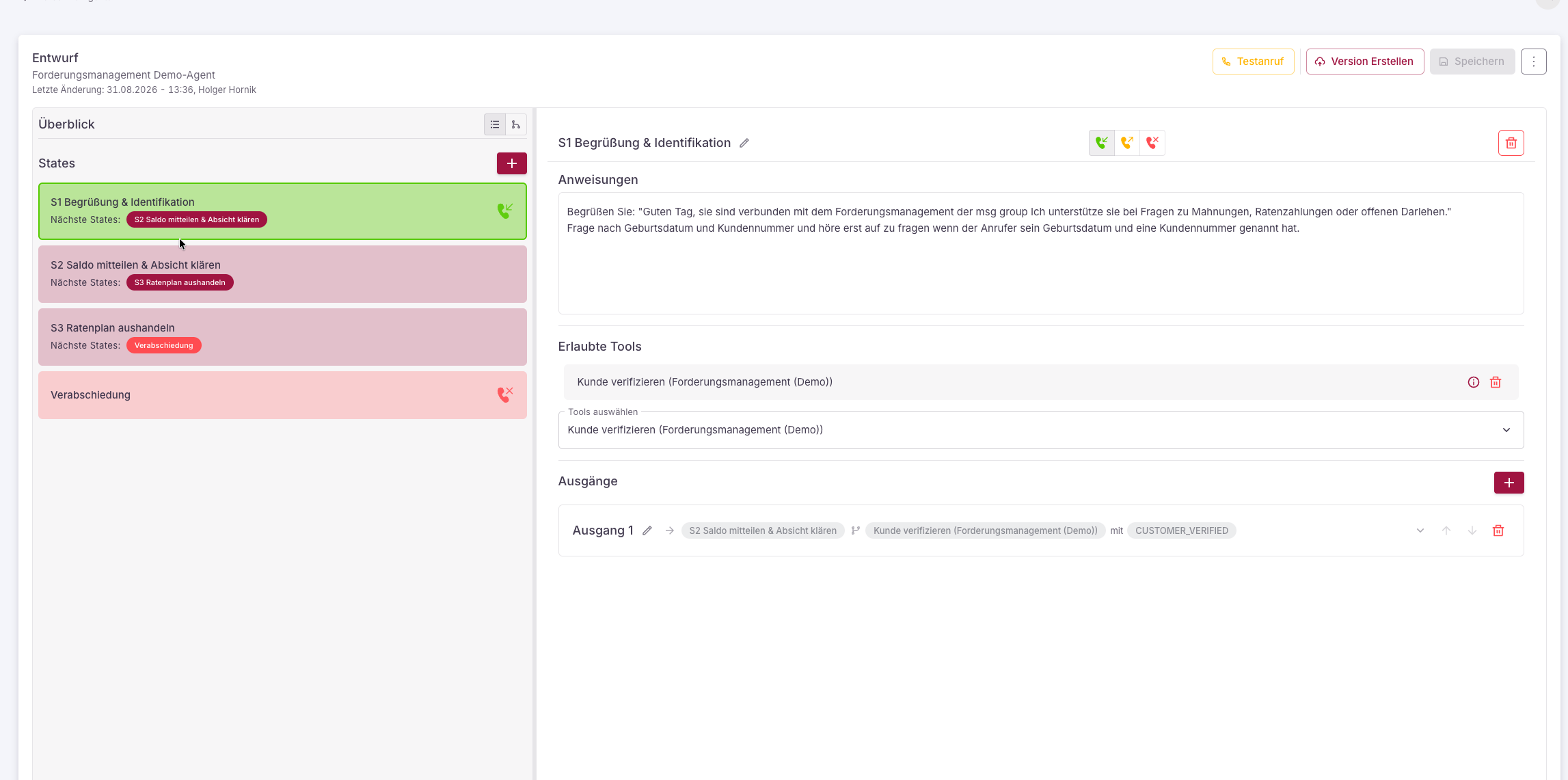
The flow editor is a graphical interface in which you arrange states as nodes and link them with connections (transitions). You can arrange the graph freely, add states, edit them, and remove them again.
 ## States
A flow consists of **states** – the steps of the conversation. A state carries its own instructions, permitted tools, and transitions to subsequent states.
Two additional points end the conversation:
Connects the call to an external phone number (e.g. to a human).
Ends the call.
## Transitions and conditions
A state has **outputs** – named, ordered transitions to subsequent states. Each output is tied to a **condition**:
* a **tool** that was called in the state,
* an expected **response code** (the result of the tool),
* optionally **negated** ("does *not* apply").
While running, the agent checks the outputs in their order. The first matching transition determines the subsequent state.
**No response code, no transition.** If a tool does not trigger a declared response code, the agent stays in the current state. This keeps you in control of the conversation's course.
### Example
```
[Greeting & request]
── classify → "termin" → [Book appointment]
── classify → "sonstiges" → [Forward: to practice]
[Book appointment]
── book_appointment → "ok" → [Hang up: Farewell]
── book_appointment → "kein_slot" → [Book appointment]
```
## Tools in a state
For each state, you define which **tools** the agent may use there. They come from three categories (details under [Integrations & Tools](/en/connectoren)):
* **[Built-in tools](/en/system-tools)** – platform-native and configuration-free, such as `classify` for sorting the request. The categories become response codes for your transitions.
* **[Connector tools](/en/connectoren)** – business actions such as "book appointment" or "look up patient" that go to your system via a connector (e.g. planorg PVS).
* **[MCP tools](/en/mcp-server)** – tools of a connected MCP server.
`classify`, transfer, and hang-up work fully. Connector-tool execution is live for the connected systems (MCP servers, planorg PVS, demo connectors).
## State instructions
Each state can carry its own **instructions** that apply only there (in addition to the agent's [base instructions](/en/agenten-verwalten)).
How to phrase good instructions – global and per step – is shown in the [Prompting Guide](/en/prompting-guide).
## Validation
The editor checks your flow continuously – for example whether all states are reachable and transitions are valid. Open issues are shown before you publish.
## Versioning
You always work on an editable **draft**.
On publishing, the draft is validated and stored as an immutable, numbered **version**.
You set a version as the **live version**. New calls use it immediately.
You can view earlier versions read-only and, if needed, reopen them as a draft.
## Import and export flows
You can **export** a complete flow as a **JSON file** and **import** it elsewhere – handy for backing up, duplicating, or transferring flows between agents.
In the flow editor, open the **⋮ menu** (top right) and choose **Export flow**. The current flow is downloaded as a JSON file. Export is also possible in the read-only version view.
In the **draft**, open the same menu and choose **Import flow**. Pick a previously exported JSON file; its content replaces the current draft. Afterwards, check the result with a [test call](/en/agenten-testen).
The import overwrites the existing **draft**. Already published versions remain untouched – the imported flow only becomes a version with the next publish.
### Structure of an export file
The file contains a `flow` object with:
* **`startStateId`** – ID of the start state.
* **`statesOrder`** – order of the states.
* **`states`** – the states, one key per state ID. A state carries:
* **`type`** – `REGULAR`, `FORWARD`, or `HANGUP`.
* **`name`** – display name.
* **`stateInstructions`** – the [instructions](#state-instructions) of the state.
* **`allowedTools`** – permitted tools (for `REGULAR`).
* **`outputsOrder`** / **`outputs`** – the outputs. Each output has a target (`transitionTo`) and **`conditions`** made of `tool`, `responseCode`, and `isNegated`.
A `FORWARD` state additionally carries the target phone number, a `HANGUP` state only a name and instructions.
### Example
An exported flow (excerpt from the demo agent "Forderungsmanagement"):
```json expandable theme={null}
{
"flow": {
"startStateId": "3b3aeb6f-3f07-4a7d-9e72-29ec1c728179",
"statesOrder": [
"3b3aeb6f-3f07-4a7d-9e72-29ec1c728179",
"5ea95814-f003-4497-ab48-b7198ff6e4b1",
"1d206d25-7529-407c-a29f-f516d66d2866",
"ebc687d6-ed86-4ac8-b6ab-412061367298"
],
"states": {
"3b3aeb6f-3f07-4a7d-9e72-29ec1c728179": {
"type": "REGULAR",
"name": "S1 Begrüßung & Identifikation",
"stateInstructions": "Begrüße den Anrufer und frage nach Geburtsdatum und Kundennummer. Frage so lange nach, bis beides genannt wurde.",
"allowedTools": ["verify_customer"],
"outputsOrder": ["0ee3293b-6e72-4472-9cb1-5a7f48a7b460"],
"outputs": {
"0ee3293b-6e72-4472-9cb1-5a7f48a7b460": {
"name": "Ausgang 1",
"transitionTo": "5ea95814-f003-4497-ab48-b7198ff6e4b1",
"conditions": [
{ "tool": "verify_customer", "responseCode": "CUSTOMER_VERIFIED", "isNegated": false }
]
}
}
},
"5ea95814-f003-4497-ab48-b7198ff6e4b1": {
"type": "REGULAR",
"name": "S2 Saldo mitteilen & Absicht klären",
"stateInstructions": "Rufe den offenen Betrag ab und lies ihn samt Rechnungsgrund und Fälligkeit vor. Frage, ob eine Ratenzahlung gewünscht ist.",
"allowedTools": ["get_balance", "classify"],
"outputsOrder": ["3477d025-58a5-4eb8-ae38-7369ada2ed13"],
"outputs": {
"3477d025-58a5-4eb8-ae38-7369ada2ed13": {
"name": "Ausgang 1",
"transitionTo": "1d206d25-7529-407c-a29f-f516d66d2866",
"conditions": [
{ "tool": "classify", "responseCode": "Ratenzahlung gewünscht", "isNegated": false }
]
}
}
},
"1d206d25-7529-407c-a29f-f516d66d2866": {
"type": "REGULAR",
"name": "S3 Ratenplan aushandeln",
"stateInstructions": "Frage nach Wunsch-Ratenanzahl ODER Wunschrate. Lies den Plan vor und hole ein klares Ja ein, bevor du verbindlich vereinbarst.",
"allowedTools": ["propose_installment_plan", "agree_installment_plan"],
"outputsOrder": ["0ac15add-b8f1-4f38-8c84-4b46352b2141"],
"outputs": {
"0ac15add-b8f1-4f38-8c84-4b46352b2141": {
"name": "Ausgang 1",
"transitionTo": "ebc687d6-ed86-4ac8-b6ab-412061367298",
"conditions": [
{ "tool": "agree_installment_plan", "responseCode": "AGREEMENT_CONFIRMED", "isNegated": false }
]
}
}
},
"ebc687d6-ed86-4ac8-b6ab-412061367298": {
"type": "HANGUP",
"name": "Verabschiedung",
"stateInstructions": "Fasse das Ergebnis in einem Satz zusammen, bedanke dich und verabschiede dich."
}
}
}
}
```
## States
A flow consists of **states** – the steps of the conversation. A state carries its own instructions, permitted tools, and transitions to subsequent states.
Two additional points end the conversation:
Connects the call to an external phone number (e.g. to a human).
Ends the call.
## Transitions and conditions
A state has **outputs** – named, ordered transitions to subsequent states. Each output is tied to a **condition**:
* a **tool** that was called in the state,
* an expected **response code** (the result of the tool),
* optionally **negated** ("does *not* apply").
While running, the agent checks the outputs in their order. The first matching transition determines the subsequent state.
**No response code, no transition.** If a tool does not trigger a declared response code, the agent stays in the current state. This keeps you in control of the conversation's course.
### Example
```
[Greeting & request]
── classify → "termin" → [Book appointment]
── classify → "sonstiges" → [Forward: to practice]
[Book appointment]
── book_appointment → "ok" → [Hang up: Farewell]
── book_appointment → "kein_slot" → [Book appointment]
```
## Tools in a state
For each state, you define which **tools** the agent may use there. They come from three categories (details under [Integrations & Tools](/en/connectoren)):
* **[Built-in tools](/en/system-tools)** – platform-native and configuration-free, such as `classify` for sorting the request. The categories become response codes for your transitions.
* **[Connector tools](/en/connectoren)** – business actions such as "book appointment" or "look up patient" that go to your system via a connector (e.g. planorg PVS).
* **[MCP tools](/en/mcp-server)** – tools of a connected MCP server.
`classify`, transfer, and hang-up work fully. Connector-tool execution is live for the connected systems (MCP servers, planorg PVS, demo connectors).
## State instructions
Each state can carry its own **instructions** that apply only there (in addition to the agent's [base instructions](/en/agenten-verwalten)).
How to phrase good instructions – global and per step – is shown in the [Prompting Guide](/en/prompting-guide).
## Validation
The editor checks your flow continuously – for example whether all states are reachable and transitions are valid. Open issues are shown before you publish.
## Versioning
You always work on an editable **draft**.
On publishing, the draft is validated and stored as an immutable, numbered **version**.
You set a version as the **live version**. New calls use it immediately.
You can view earlier versions read-only and, if needed, reopen them as a draft.
## Import and export flows
You can **export** a complete flow as a **JSON file** and **import** it elsewhere – handy for backing up, duplicating, or transferring flows between agents.
In the flow editor, open the **⋮ menu** (top right) and choose **Export flow**. The current flow is downloaded as a JSON file. Export is also possible in the read-only version view.
In the **draft**, open the same menu and choose **Import flow**. Pick a previously exported JSON file; its content replaces the current draft. Afterwards, check the result with a [test call](/en/agenten-testen).
The import overwrites the existing **draft**. Already published versions remain untouched – the imported flow only becomes a version with the next publish.
### Structure of an export file
The file contains a `flow` object with:
* **`startStateId`** – ID of the start state.
* **`statesOrder`** – order of the states.
* **`states`** – the states, one key per state ID. A state carries:
* **`type`** – `REGULAR`, `FORWARD`, or `HANGUP`.
* **`name`** – display name.
* **`stateInstructions`** – the [instructions](#state-instructions) of the state.
* **`allowedTools`** – permitted tools (for `REGULAR`).
* **`outputsOrder`** / **`outputs`** – the outputs. Each output has a target (`transitionTo`) and **`conditions`** made of `tool`, `responseCode`, and `isNegated`.
A `FORWARD` state additionally carries the target phone number, a `HANGUP` state only a name and instructions.
### Example
An exported flow (excerpt from the demo agent "Forderungsmanagement"):
```json expandable theme={null}
{
"flow": {
"startStateId": "3b3aeb6f-3f07-4a7d-9e72-29ec1c728179",
"statesOrder": [
"3b3aeb6f-3f07-4a7d-9e72-29ec1c728179",
"5ea95814-f003-4497-ab48-b7198ff6e4b1",
"1d206d25-7529-407c-a29f-f516d66d2866",
"ebc687d6-ed86-4ac8-b6ab-412061367298"
],
"states": {
"3b3aeb6f-3f07-4a7d-9e72-29ec1c728179": {
"type": "REGULAR",
"name": "S1 Begrüßung & Identifikation",
"stateInstructions": "Begrüße den Anrufer und frage nach Geburtsdatum und Kundennummer. Frage so lange nach, bis beides genannt wurde.",
"allowedTools": ["verify_customer"],
"outputsOrder": ["0ee3293b-6e72-4472-9cb1-5a7f48a7b460"],
"outputs": {
"0ee3293b-6e72-4472-9cb1-5a7f48a7b460": {
"name": "Ausgang 1",
"transitionTo": "5ea95814-f003-4497-ab48-b7198ff6e4b1",
"conditions": [
{ "tool": "verify_customer", "responseCode": "CUSTOMER_VERIFIED", "isNegated": false }
]
}
}
},
"5ea95814-f003-4497-ab48-b7198ff6e4b1": {
"type": "REGULAR",
"name": "S2 Saldo mitteilen & Absicht klären",
"stateInstructions": "Rufe den offenen Betrag ab und lies ihn samt Rechnungsgrund und Fälligkeit vor. Frage, ob eine Ratenzahlung gewünscht ist.",
"allowedTools": ["get_balance", "classify"],
"outputsOrder": ["3477d025-58a5-4eb8-ae38-7369ada2ed13"],
"outputs": {
"3477d025-58a5-4eb8-ae38-7369ada2ed13": {
"name": "Ausgang 1",
"transitionTo": "1d206d25-7529-407c-a29f-f516d66d2866",
"conditions": [
{ "tool": "classify", "responseCode": "Ratenzahlung gewünscht", "isNegated": false }
]
}
}
},
"1d206d25-7529-407c-a29f-f516d66d2866": {
"type": "REGULAR",
"name": "S3 Ratenplan aushandeln",
"stateInstructions": "Frage nach Wunsch-Ratenanzahl ODER Wunschrate. Lies den Plan vor und hole ein klares Ja ein, bevor du verbindlich vereinbarst.",
"allowedTools": ["propose_installment_plan", "agree_installment_plan"],
"outputsOrder": ["0ac15add-b8f1-4f38-8c84-4b46352b2141"],
"outputs": {
"0ac15add-b8f1-4f38-8c84-4b46352b2141": {
"name": "Ausgang 1",
"transitionTo": "ebc687d6-ed86-4ac8-b6ab-412061367298",
"conditions": [
{ "tool": "agree_installment_plan", "responseCode": "AGREEMENT_CONFIRMED", "isNegated": false }
]
}
}
},
"ebc687d6-ed86-4ac8-b6ab-412061367298": {
"type": "HANGUP",
"name": "Verabschiedung",
"stateInstructions": "Fasse das Ergebnis in einem Satz zusammen, bedanke dich und verabschiede dich."
}
}
}
}
```