> ## Documentation Index
> Fetch the complete documentation index at: https://docs.msghello.ai/llms.txt
> Use this file to discover all available pages before exploring further.
# Prompting Guide
> How to steer your agent with good instructions – globally and per conversation step.
An agent does what you tell it in words. msg.Hello uses a **real-time speech model** – and that follows different rules than typing with a chatbot: short, clear, and written for the **spoken** word. This guide shows you **where** to put **what** and **how** to phrase it.
## Two levels: global and per step
Instructions live in two places:
| Level | Where in the portal | Applies |
| ------------ | -------------------------------------------------------------------------- | -------------------------------------------------------- |
| **Global** | Agent tab **Base instructions** | to the **entire** conversation, loaded once at the start |
| **Per step** | Field **Instructions** on each state in the [flow editor](/en/flows-bauen) | only in **this** conversation phase |
Behind the scenes, msg.Hello combines both levels into **one** prompt and sends it to the speech model – in this order:
```
System role (global)
Global rules (global)
Critical rules (global – automatically UPPERCASED)
Instructions (current step)
Permitted tools (current step)
```
On **every switch** into a new state, the prompt is **reassembled**: the global base stays, only the "Instructions" and "Permitted tools" change. So put fundamentals in global and phase-specific things on the step.
## Base instructions (global)
The **Base instructions** tab has three fields. Capture here everything that should **always** apply.
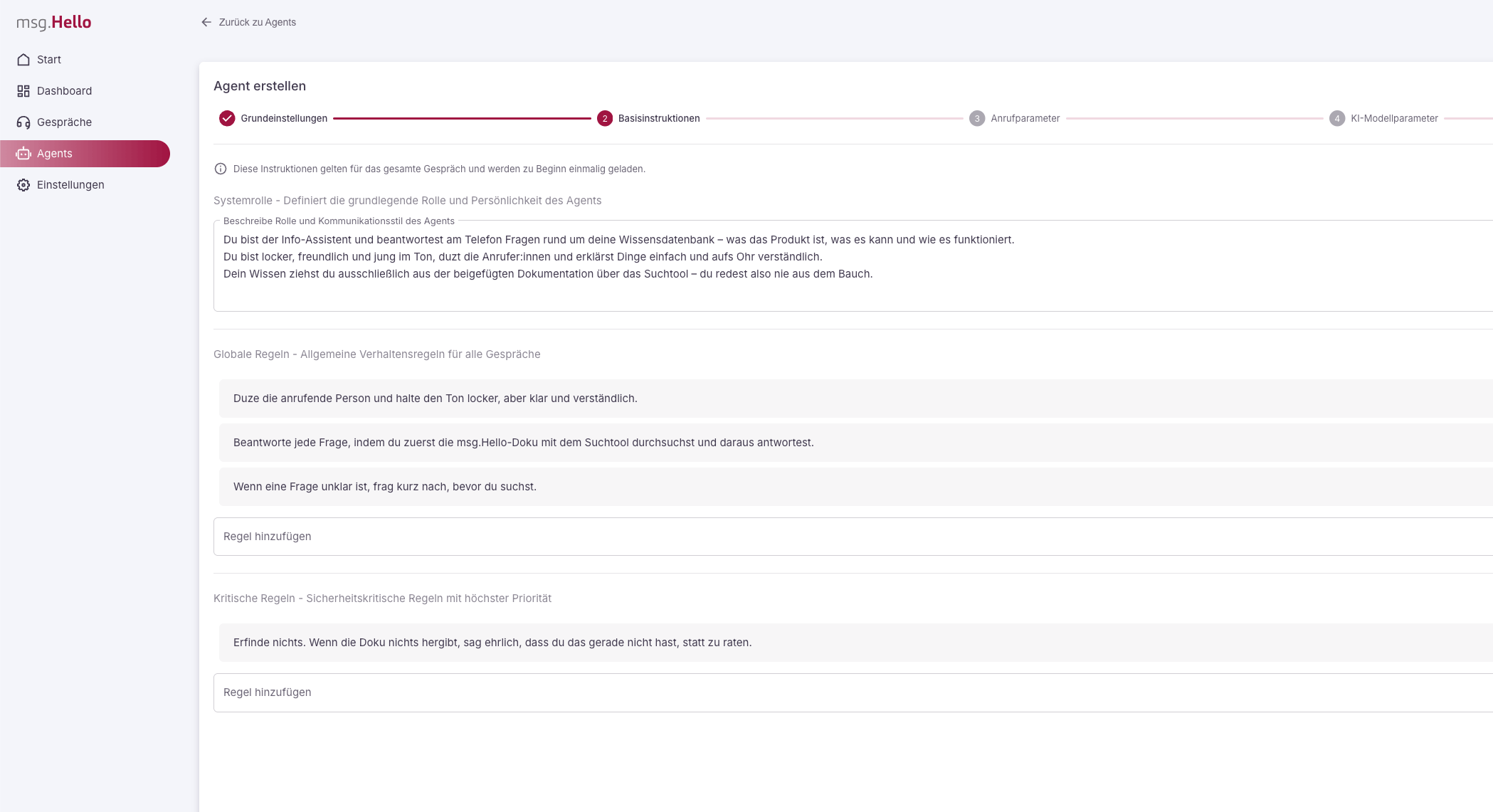 ### System role
Who the agent is, **what it should achieve**, and how it sounds (role · goal · personality/tone) – in a few sentences.
```
You are the friendly phone reception of Muster GmbH. Your goal is to
recognize the caller's request and connect them to the right team.
You speak calmly, warmly, and get to the point quickly.
```
### Global rules
Short behavioral rules that apply in **every** step. As a list, not as running text.
```
- Address the caller formally.
- Only ever ask one question at a time.
- Answer in 2–3 short sentences.
- Always reply in German.
- Vary your wording; do not keep repeating the same sentences.
```
### Critical rules
The **non-negotiable** boundaries. Include only the most important things here.
Critical rules are automatically **uppercased** in the assembled prompt so the model weights them especially strongly. Use the field deliberately – too many "critical" rules weaken the effect.
```
- Never make up information. If you do not know something, say so and forward the call.
- Never give medical, legal, or financial advice.
```
## Instructions per step
The **Instructions** field of a state holds **only the goal and behavior of that one phase** – kept short. Do **not** repeat the base instructions here.
"Greet the caller in a friendly way and ask openly what it is about."
"Assign the request to a category. If it is unclear, ask once before deciding."
"Briefly announce that you are connecting, and forward to the responsible team."
What the agent **may do** in this step is defined via **Permitted tools**; **where** it goes next per result is defined via the **Outputs**. With the built-in tool [`classify`](/en/system-tools), the possible **categories are exactly the response codes** you set in the outputs of this step.
## Writing for the voice
A speech model is steered differently than a text chatbot. These points make the biggest difference:
* **Short and spoken.** 2–3 sentences per answer, bullet points instead of paragraphs, one question per turn.
* **Lead with example sentences.** Provide sample phrasings – the model leans heavily on them. ("Say something like: 'One moment, I'll connect you.'")
* **Confirm numbers, email, and names.** Have the agent read back what was said: "I have 0176 … – is that correct?"
* **Pin down the language.** Write "Always reply in German" explicitly if the agent otherwise switches languages.
* **Unclear audio.** Instruct it to react only to what was **clearly understood** and otherwise politely ask for a repeat – **do not guess**.
* **Avoid repetition.** A rule for variety prevents it from sounding robotic.
* **Emphasize the essentials.** Put the one decisive rule in UPPERCASE – or place it in the "Critical rules", where it is emphasized automatically.
**Voice**, **interruptibility** (barge-in), and **noise suppression** are not prompt topics but settings on the agent (tab "AI model parameters"). See [Manage Agents](/en/agenten-verwalten).
## Getting better step by step
* **One change per [test call](/en/agenten-testen).** That way you can tell what actually worked.
* **Phrase small, test big.** Even small wording changes noticeably alter the behavior.
* **[Evaluate transcripts](/en/anrufe-auswerten).** Address recurring misunderstandings deliberately with **one** new rule – instead of many at once.
## Full example: reception agent
This is what a lean, complete set of instructions for the reception agent from the [quickstart](/en/erste-schritte) looks like.
**Base instructions (global)**
```
System role
You are the friendly phone reception of Muster GmbH. Your goal is to recognize
the caller's request and connect them to the right team. You speak calmly,
warmly, and get to the point quickly.
Global rules
- Address the caller formally.
- Only ever ask one question at a time.
- Answer in 2–3 short sentences, always in German.
- Vary your wording.
Critical rules
- Never make up information. When in doubt, forward the call.
- Do not give medical, legal, or financial advice.
```
**Step "Classify the request" (Instructions)**
```
Greet briefly and ask openly what it is about. Assign the request to exactly one
category: vertrieb, support, or sonstiges. If it is unclear, ask once before you
decide. React only to what was clearly understood; otherwise politely ask for a
repeat.
```
* **Permitted tools:** `classify`
* **Outputs:** `vertrieb` → forward to Sales · `support` → forward to Support · `sonstiges` → forward to Reception
Check the agent after every change with a [test call](/en/agenten-testen) before you publish a new version.
### System role
Who the agent is, **what it should achieve**, and how it sounds (role · goal · personality/tone) – in a few sentences.
```
You are the friendly phone reception of Muster GmbH. Your goal is to
recognize the caller's request and connect them to the right team.
You speak calmly, warmly, and get to the point quickly.
```
### Global rules
Short behavioral rules that apply in **every** step. As a list, not as running text.
```
- Address the caller formally.
- Only ever ask one question at a time.
- Answer in 2–3 short sentences.
- Always reply in German.
- Vary your wording; do not keep repeating the same sentences.
```
### Critical rules
The **non-negotiable** boundaries. Include only the most important things here.
Critical rules are automatically **uppercased** in the assembled prompt so the model weights them especially strongly. Use the field deliberately – too many "critical" rules weaken the effect.
```
- Never make up information. If you do not know something, say so and forward the call.
- Never give medical, legal, or financial advice.
```
## Instructions per step
The **Instructions** field of a state holds **only the goal and behavior of that one phase** – kept short. Do **not** repeat the base instructions here.
"Greet the caller in a friendly way and ask openly what it is about."
"Assign the request to a category. If it is unclear, ask once before deciding."
"Briefly announce that you are connecting, and forward to the responsible team."
What the agent **may do** in this step is defined via **Permitted tools**; **where** it goes next per result is defined via the **Outputs**. With the built-in tool [`classify`](/en/system-tools), the possible **categories are exactly the response codes** you set in the outputs of this step.
## Writing for the voice
A speech model is steered differently than a text chatbot. These points make the biggest difference:
* **Short and spoken.** 2–3 sentences per answer, bullet points instead of paragraphs, one question per turn.
* **Lead with example sentences.** Provide sample phrasings – the model leans heavily on them. ("Say something like: 'One moment, I'll connect you.'")
* **Confirm numbers, email, and names.** Have the agent read back what was said: "I have 0176 … – is that correct?"
* **Pin down the language.** Write "Always reply in German" explicitly if the agent otherwise switches languages.
* **Unclear audio.** Instruct it to react only to what was **clearly understood** and otherwise politely ask for a repeat – **do not guess**.
* **Avoid repetition.** A rule for variety prevents it from sounding robotic.
* **Emphasize the essentials.** Put the one decisive rule in UPPERCASE – or place it in the "Critical rules", where it is emphasized automatically.
**Voice**, **interruptibility** (barge-in), and **noise suppression** are not prompt topics but settings on the agent (tab "AI model parameters"). See [Manage Agents](/en/agenten-verwalten).
## Getting better step by step
* **One change per [test call](/en/agenten-testen).** That way you can tell what actually worked.
* **Phrase small, test big.** Even small wording changes noticeably alter the behavior.
* **[Evaluate transcripts](/en/anrufe-auswerten).** Address recurring misunderstandings deliberately with **one** new rule – instead of many at once.
## Full example: reception agent
This is what a lean, complete set of instructions for the reception agent from the [quickstart](/en/erste-schritte) looks like.
**Base instructions (global)**
```
System role
You are the friendly phone reception of Muster GmbH. Your goal is to recognize
the caller's request and connect them to the right team. You speak calmly,
warmly, and get to the point quickly.
Global rules
- Address the caller formally.
- Only ever ask one question at a time.
- Answer in 2–3 short sentences, always in German.
- Vary your wording.
Critical rules
- Never make up information. When in doubt, forward the call.
- Do not give medical, legal, or financial advice.
```
**Step "Classify the request" (Instructions)**
```
Greet briefly and ask openly what it is about. Assign the request to exactly one
category: vertrieb, support, or sonstiges. If it is unclear, ask once before you
decide. React only to what was clearly understood; otherwise politely ask for a
repeat.
```
* **Permitted tools:** `classify`
* **Outputs:** `vertrieb` → forward to Sales · `support` → forward to Support · `sonstiges` → forward to Reception
Check the agent after every change with a [test call](/en/agenten-testen) before you publish a new version.